Microsoft Teams automatically switches your status to away after exactly five minutes of inactivity. It's a frustrating reality for remote workers who need to step away for a quick coffee without looking like they've abandoned their desk.
We often spend more time worrying about our green status dot than actually finishing our deep work. I've rounded up the best chrome extensions for remote workers to help you reclaim your focus, secure your data, and maintain a professional presence in 2025.
Best Chrome Extensions for Remote Workers: How to Choose
Optimize remote workflows using StopVeille for presence, Loom for async video, and 1Password for security. Prioritize extensions with limited site permissions and low RAM impact to maintain system speed and data integrity.
Auditing Security and Extension Permissions
Permissions like "read and change all your data" carry real risks. Many tools request broad access they don't actually need. You're giving away the keys to your professional life.
Always check the developer's reputation first. Look for verified badges in the Web Store. Read privacy policies for data selling clauses. Limit access to specific URLs whenever possible.
Revoke access for unused tools. Keep your browser clean.
Managing Browser Memory and Performance
High RAM usage triggers annoying system lag. Want to know why your laptop is crawling? Use the Chrome Task Manager to spot resource-heavy culprits immediately.
Feature-heavy extensions often run background processes. These hidden tasks slow down your video calls. Disable them when you aren't actively using their specific features to save power.
Regular audits prevent browser bloat. Remove any add-on you haven't clicked in a month. This habit keeps your laptop fans quiet and your workflow fast.
StopVeille: Keep Your Teams Status Green and Active
Performance is vital, but maintaining visibility within your remote team is equally important for professional presence.
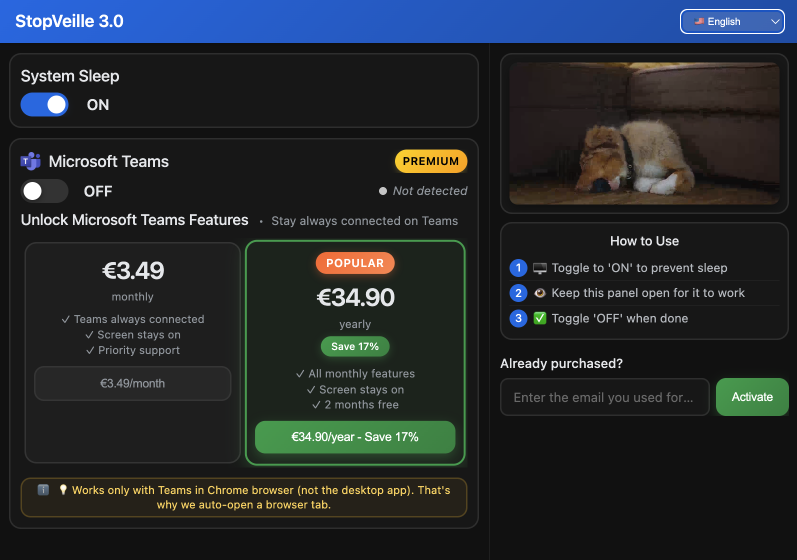
StopVeille prevents your Microsoft Teams status from switching to "Away" during deep work. It simulates activity to keep your icon green. This reduces the pressure of constant availability. You can focus on your actual tasks without being micromanaged.
The tool is lightweight and runs discreetly. It helps remote workers manage their digital presence effectively. No complex setup is required for daily use.
Use it to protect your focus blocks. It signals to colleagues that you're still at your desk. This builds trust while you handle complex projects.
StopVeille bridges the gap between productivity and visibility. It's a specialized solution for the modern remote employee. Maintain your professional rhythm without technical interruptions.
Can Loom Help You Skip Your Next Zoom Meeting?
While staying visible is key, reducing the number of live meetings can significantly boost your daily output.
Loom allows you to record your screen and camera simultaneously. You can share feedback or tutorials without scheduling a call. Recipients watch the video at their own convenience.
Async communication cuts through the noise of endless calendar invites. It provides a clear, visual record of your thoughts. This method is often more efficient than a long, confusing email chain.
You can track who viewed your video. This ensures your message reached the right person. It simplifies project handoffs between different time zones.
Replace your daily stand-ups with quick video updates. Your team stays informed without losing focus. Loom makes remote collaboration feel personal and direct.
OneTab: Reclaim Your Browser Memory and Focus
Managing communication is one thing, but managing the chaos of dozens of open tabs is another challenge entirely.
OneTab collapses all your open tabs into a single, organized list. This action saves up to 95% of your browser memory. It instantly cleans your workspace.
Tab clutter creates mental fatigue and slows down your computer. OneTab acts as a temporary bookmarking system. You can restore your tabs individually or all at once later.
Group your tabs by project or research topic. This helps you switch between different work contexts easily. It prevents the anxiety of losing important information.
Use this tool to end your workday with a clean slate. Your browser will start faster the next morning. It is a must-have for research-heavy roles.
Toggl Track for Painless Remote Time Management
Once your browser is organized, you need a way to measure where your actual working hours are going.
Toggl Track integrates directly into your browser toolbar. You can start and stop timers with just one click. It even sends reminders if you forget to track your time.
Visual reports show exactly how much time you spend on specific clients. This data is vital for accurate billing and self-discipline. It reveals hidden time-wasters in your daily schedule.
The extension works across various project management tools like Trello or Asana. You don't have to switch windows to log your hours. It keeps your focus strictly on the task.
Use the Pomodoro feature to maintain a healthy work-rest balance. It helps prevent burnout during those long remote shifts. Time tracking quickly becomes a natural, effortless habit.
Is Grammarly the Secret to Better Remote Emails?
Tracking your time ensures efficiency, but the quality of your written communication defines your professional reputation. Grammarly checks your spelling and grammar in real-time. It works across Gmail, Slack, and LinkedIn. It catches embarrassing typos before you hit send.
The tone detector helps you sound professional yet accessible. This is crucial when you can't rely on body language. It ensures your messages are clear and polite. You'll stay optimistic even during stressful deadlines.
Use the suggestions to simplify complex sentences. Short, punchy writing is better for busy remote colleagues. It improves the overall impact of your ideas. You're making life easier for everyone in your inbox.
Grammarly acts as a final safety net for your writing. It builds confidence in your digital interactions. Professionalism becomes effortless with this real-time assistant. It's one of the best chrome extensions for remote workers today.
1Password for Managing Secure Team Credentials
Beyond clear writing, protecting the sensitive data you share with your team is a top priority.
1Password stores all your professional logins in a secure vault. It generates strong, unique passwords for every site. You only need to remember one master key.
Shared vaults allow teams to access common tools safely. No more sending passwords via insecure chat messages. It streamlines the onboarding process for new remote hires.
The extension auto-fills credentials instantly. This saves time and prevents phishing attacks. It monitors your accounts for potential data breaches or leaks.
Security is non-negotiable in a remote work environment. 1Password provides peace of mind for you and your clients. Protect your digital identity with professional-grade encryption.
Momentum for Tracking Daily Goals and Focus
With your security and communication handled, you need a final tool to keep your daily goals front and center.
Momentum replaces your blank new tab page with a personal dashboard. It asks for your main focus every morning. This simple prompt keeps you on track.
The extension features beautiful photography and inspiring quotes. It includes a built-in to-do list for smaller tasks. Seeing your goal every time you open a tab is powerful.
Customize the dashboard to show weather or world clocks. This is helpful for teams working across different regions. It creates a calm digital environment.
Momentum reduces the urge to visit distracting websites. It serves as a visual anchor for your productivity. Start every work session with clarity and intent.
Mastering your workflow is about picking the right tools for presence, security, and focus. By integrating the best chrome extensions for remote workers like StopVeille and 1Password, you'll reclaim hours of lost productivity. Grab these tools now to transform your browser into a high-performance command center. Elevate your remote game today.
See also: Best mouse jiggler 2026: top tools to stay active on Teams · How to stay active online status apps across all platforms
FAQ
What are the best Chrome extensions for remote workers to stay productive?
In 2025, the best chrome extensions for remote workers focus on balancing deep focus with team visibility. For managing your professional presence, StopVeille is a game-changer because it keeps your Microsoft Teams status green while you're actually working. Tools like Loom for async video and Toggl Track for time management are also essential for staying on top of your daily goals without the burnout.
How can I keep my Microsoft Teams status active while working remotely?
The most reliable way is using the StopVeille extension. It interacts with the web version of Teams to simulate activity, preventing your status from flipping to "Away" the second you focus on another task. It’s lightweight, runs in your browser, and even has an "Auto-Enable Sleep" feature to save your battery when you're actually done for the day.
Which Chrome extensions help with work-from-home productivity?
If you're struggling with distractions, BlockSite or StayFocusd are your best bets for locking down time-wasting websites. For organizing your digital workspace, OneTab is a lifesaver, it collapses all those open tabs into a single list, saving up to 95% of your browser's memory and giving your laptop (and your brain) some much-needed breathing room.
Are there browser tools that make remote communication easier?
Absolutely. Grammarly is a must-have for keeping your emails and Slack messages professional and typo-free. To cut down on unnecessary meetings, Loom lets you record quick screen shares so your team can watch your updates on their own time. These remote work browser tools help you maintain that personal touch without losing your entire afternoon to Zoom calls.
How do I manage passwords and security when working from home?
Security is non-negotiable when you're off the corporate network. 1Password is the gold standard for remote teams, allowing you to store and share credentials through secure vaults. It generates strong passwords and auto-fills them instantly, so you aren't wasting time hunting for login info or, worse, sending sensitive passwords over a chat app.
Can Chrome extensions really speed up my browser performance?
They can if you use the right ones. Extensions like Ghostery block trackers that slow down page loads, while OneTab prevents "tab bloat" from eating up your RAM. Just remember to do a quick audit every month and remove any tools you aren't using to keep your chrome extensions for productivity running at peak speed.